Transformations API Overview
Introduction
The Transformations API enables the transformation of iModel data. This API helps you to perform various transformation actions on the source iModel, creating a customized iModel tailored to specific needs.
Key Features
- Transform data from an iModel while ensuring data consistency, and view the list of transformations applied to the specific iModel.
- Combine multiple iModels into one.
- Filter data using a saved view, or ECSQL query.
- Receive notifications when transformation results are ready.
Workflow
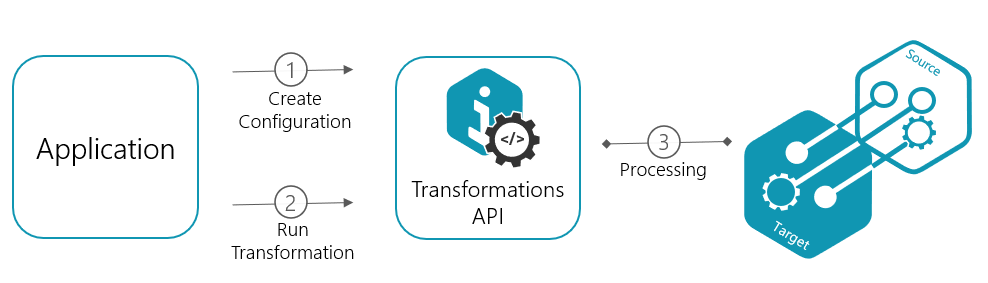
To apply the required transformation, follow these steps:
- Create Configuration: Use the necessary endpoint from the Configurations category to define the required transformation. For example, Filter By Saved View. Configurations can be reused for multiple transformation jobs.
- Run Transformation: Use the Create Transformation endpoint to execute the transformation based on the previously created configuration. You can also check the job status or listen to the job completion event.
Use Cases
Transforming engineering data is a powerful asset for infrastructure projects, where effective management, organization, and visualization of large datasets are pivotal. At the same time, it is essential to ensure the ability to provide precise and relevant data views.
Optimize for a specific purpose: Engage a diverse range of stakeholders at various stages of the project, including design, construction, and operations, by catering to their tailored information needs. A focused iModel dataset allows for seamless querying and extraction of valuable insights from complex projects. Utilizing filters will enhance data quality by eliminating unnecessary or sensitive information.
Integrate multidisciplinary approaches: Break down iModels into smaller discipline units to address potential integrity issues, or combine multiple iModels to achieve a holistic view.
Enhance collaboration and decision-making: Leveraging iModel filtering options to isolate pertinent data enables stakeholders to concentrate on what truly matters, leading to more informed collaboration and decision-making throughout the lifecycle.
Was this page helpful?