Changed Elements V3 API Overview
Introduction
The Changed Elements API lets your application reliably detect and consume element-level (or instance-level) changes between two points in an iModel's history. Instead of inspecting full models or manually diffing revisions, you can request a structured comparison that tells you exactly which elements were added, updated, or deleted — ready to be visualized, automated, or audited.
Key Features
- Precision change scoping: Compare a specific iModel changeset range to process only what matters.
- Actionable diff insights: Obtain comparison reports with clear classification of added, modified, and deleted elements, delivered as JSON for easy integration into downstream systems.
- Predefiend and flexible diffing strategies: Tailor output to your use case - whether for lightweight 3D visualization, compliance auditing, or deeper semantic change analysis - minimizing noise and improving efficiency. Choose a predefined strategy to match your needs or compose a custom pipeline from reusable processing steps.
- Configurable output: Control the response shape, and which fields are included or renamed, independent of the strategy or pipeline that produced the results.
- Asynchronous processing with notifications: Offload heavy comparison jobs and get notified when results are ready.
- High-performance parallel execution: Leverage parallelized processing to accelerate result generation, even for large and complex datasets.
What’s new in the V3 API
V3 introduces diff jobs and diffing strategies, replacing the older strict comparison results a more flexible workflow. Learn more in the Diffing Strategies section below.
Use Cases
Comparing changes in engineering data is essential for workflows in construction, architecture, engineering, and facilities management. Enhance your applications with change timelines and detailed analysis for better visualization and decision-making.
- Change management and version control: Integrate change comparison results to track and compare modifications made by multiple stakeholders, ensuring the integrity of the iTwin.
- Risk mitigation and error prevention: Identify discrepancies between different versions of iModels to prevent costly errors and reduce rework and delays.
- Effective collaboration and communication: Create color-coded visualizations to highlight changes, allowing team members to understand modifications without checking individual files, thereby saving days of manual effort.
- Ensuring compliance and deliverables quality control: Comparing various iModel versions helps verify that updates comply with standards and prevents disputes among stakeholders by providing clear evidence of changes.
Workflow
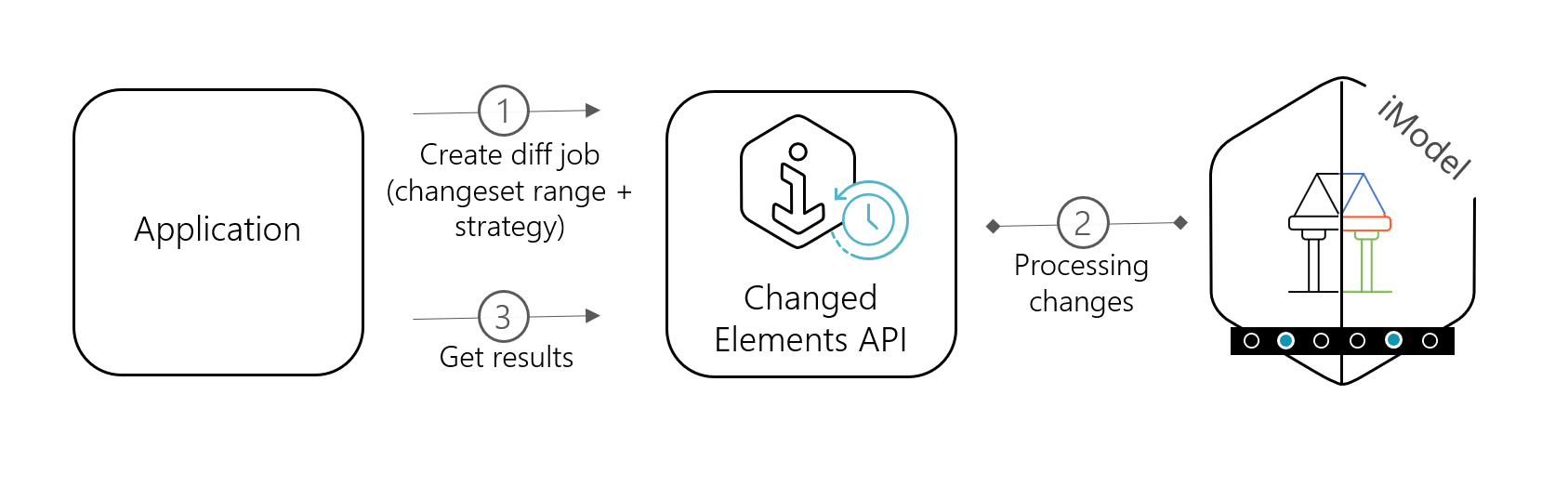
You tell the service which two points in an iModel's history that you care about, and it computes the differences and returns a focused result set that your application can consume once it's ready:
- Create a diff job: Use the
POST /diffendpoint to queue a diff job by specifying the iModel, changeset range, and adiffingPlan(a predefined strategy or a custom pipeline). - Track job progress: Use the
GET /diff/{id}endpoint to poll for job progress, or subscribe to thediffjob.completed.v1iTwin Event to be notified when the job completes. - Retrieve diff results: Once the results are ready, the
statusreturned byGET /diff/{id}is marked asCompletedand the response includes an href link to the results - ready to be used by your application, for example, for color-coding changes in an iTwin.js or Cesium.js application.
The diagram below illustrates the workflow:
For more information on using the API, please see the Changed Elements API V3 Tutorial.
Diffing Strategies
A diffing strategy determines how changes between iModel changesets are analyzed, specifying the structure and granularity of the resulting data. This enables applications to select the appropriate amount of detail - ranging from element-level changes to more granular property-level difference - based on specific requirements. The Changed Elements API offers predefined strategies for standard workflows and provides the flexibility to extend or customize behavior as needed.
Inserted/Updated/Deleted) onlyKey considerations:
- More detailed strategies increase payload size and processing time.
- Choose the simplest strategy that fits your use case.
- Customize a strategy with an output configuration to align the output format with how your application wants it.
Custom diffing pipelines
If the predefined strategies and their output options can't produce the data you need, instead define a custom pipeline — an ordered list of named processing steps that compute, filter, and enrich change data. These steps are reusable building blocks that can be assembled into a diffing strategy tailored to your workflow, including:
- Computing changes over the changeset range
- Dropping duplicate updates to the same element
- Dropping non-element (or non-geometric) instances
- Filtering fields down to what your workflow needs
{
  "diffingPlan": {
    "pipeline": [
      { "name": "compute-changes" },
      { "name": "drop-duplicate-updates" },
      { "name": "filter-fields", "config": { "keepOnly": ["ECInstanceId", "ECClassId", "$meta"] } }
    ],
    "output": { "format": "basic", "idEncoding": "hex" }
  }
}
An optional output configuration controls the shape of the final response — including the payload format, element id encoding, and which fields are kept, dropped, or renamed — independent of the strategy or pipeline that produced the results.
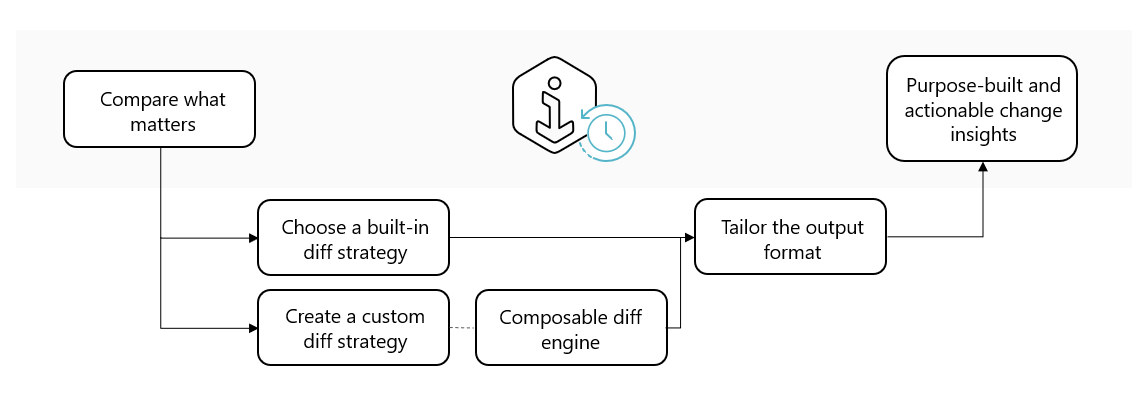
Build the right comparison for your workflow
For a full description of strategies, pipeline steps, and output options, see the Diffing Plan Overview and Diffing Pipelines & Strategies.
Tutorial
For more information on how to use the API, please check out the Changed Elements API V3 Tutorial.
To better understand how to configure a custom diffing pipeline, please check out the Configurable Pipelines Tutorial.
Was this page helpful?